Everything three.js leaves to you, built in.

three.js gives you a renderer. Everything after that is your job: loaders, environment lighting, shadows, post-processing, controls, the game loop, the HUD, audio, asset handling, licensing and the deploy checks. Aura3D ships all of that as one engine and one toolchain, with its own renderer (WebGPU with a WebGL2 fallback, optionally in a worker), a typed declarative scene and an asset pipeline that will not let an unverified model reach production. It is built from the start to be written by AI coding agents.

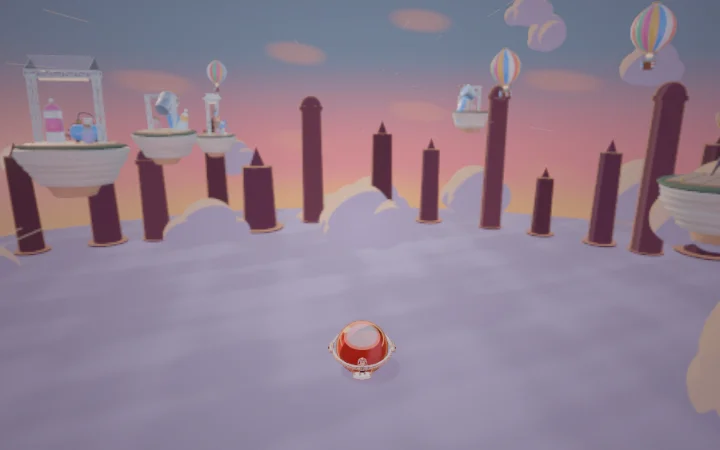
Splat: a glossy paint ball rolling down a sunset sky track, rendered by Aura3D
hero.tsthe whole app · 10 lines
import { camera, createAuraApp, interactions, looks, model, scene } from "@aura3d/engine";
import { assets } from "./aura-assets";

createAuraApp("#app", {
  scene: scene()
    .add(looks.preset("product-studio"))
    .add(model(assets.product, { name: "product", targetHeight: 1.6, castShadow: true }))
    .add(interactions.orbit({ target: "product" }))
    .camera(camera.frameAsset(assets.product, { targetHeight: 1.6 })),
  ...looks.appOptions("product-studio")
});
Splat, one of 30 playable games built with Aura3D. Rendered with WebGPU by default, WebGL2 as the fallback.
24 vs 49scene lines for a PBR viewer with HDR lighting, shadow, bloom and orbit controls (Aura3D benchmark, five scenes)
1 vs 8import modules for the same viewer
10 linesfor a lit, framed, orbitable product. The matched three.js app is 38 lines before orbit controls.
30playable games built on Aura3D

Line counts include imports and skip blank lines. Aura3D benchmark, five scenes; the method and sources are under “How we measured” below.

The same product shot. A quarter of the code.

Both scenes load the same GLB with HDR studio lighting, a shadow-casting key light, tone mapping and a framed camera. The Aura3D version also adds orbit controls in its 10 lines.

three.js main.ts38 lines
import * as THREE from "three";
import { GLTFLoader } from "three/addons/loaders/GLTFLoader.js";
import { HDRLoader } from "three/addons/loaders/HDRLoader.js";

const renderer = new THREE.WebGLRenderer({ antialias: true });
renderer.setPixelRatio(Math.min(devicePixelRatio, 2));
renderer.setSize(innerWidth, innerHeight);
renderer.toneMapping = THREE.NeutralToneMapping;
renderer.shadowMap.enabled = true;
document.querySelector("#app")!.appendChild(renderer.domElement);

const scene = new THREE.Scene();
scene.background = new THREE.Color("#2b2f36");
const camera = new THREE.PerspectiveCamera(35, innerWidth / innerHeight, 0.1, 100);
const pmrem = new THREE.PMREMGenerator(renderer);
new HDRLoader().load("/hdri/studio_small_08_1k.hdr", (hdr) => {
  scene.environment = pmrem.fromEquirectangular(hdr).texture;
  scene.environmentIntensity = 1.1;
  hdr.dispose();
});

const key = new THREE.DirectionalLight("#ffffff", 2.4);
key.position.set(6.52, 18.39, 13.98);
key.castShadow = true;
key.shadow.mapSize.set(2048, 2048);
scene.add(key);

new GLTFLoader().load("/aura-assets/product-fixture.glb", (gltf) => {
  gltf.scene.traverse((o) => { if ((o as THREE.Mesh).isMesh) o.castShadow = o.receiveShadow = true; });
  scene.add(gltf.scene);
  const box = new THREE.Box3().setFromObject(gltf.scene);
  const center = box.getCenter(new THREE.Vector3());
  const dist = box.getSize(new THREE.Vector3()).length() / (2 * Math.tan((camera.fov * Math.PI) / 360));
  camera.position.copy(center).add(new THREE.Vector3(0.5, 0.35, 1).normalize().multiplyScalar(dist));
  camera.lookAt(center);
});

addEventListener("resize", () => {
  camera.aspect = innerWidth / innerHeight;
  camera.updateProjectionMatrix();
  renderer.setSize(innerWidth, innerHeight);
});
renderer.setAnimationLoop(() => renderer.render(scene, camera));
Aura3D main.ts10 lines
import { camera, createAuraApp, interactions, looks, model, scene } from "@aura3d/engine";
import { assets } from "./aura-assets";

createAuraApp("#app", {
  scene: scene()
    .add(looks.preset("product-studio"))
    .add(model(assets.product, { name: "product", targetHeight: 1.6, castShadow: true }))
    .add(interactions.orbit({ target: "product" }))
    .camera(camera.frameAsset(assets.product, { targetHeight: 1.6 })),
  ...looks.appOptions("product-studio")
});

Both files are in the Aura3D repository: tools/bench-vs-threejs/tagline/three-minimal/main.ts and tools/bench-vs-threejs/tagline/aura-variants/hero.ts. Both build with a stock vite build.

Eight reasons, each with the code behind it

Everything here shipped through 5.5.6. Each card names its source and the scope of the check behind it.

1. Typed scenes, typed assets

The CLI admits a model with its source, licence and sha256 and generates a typed key. A misspelt asset is a TypeScript error, not a 404, and in production an unverified model does not draw.

npx @aura3d/cli@latest assets resolve "robot" --name robot

scene().add(model(assets.robot, { targetHeight: 1.8 }))

templates/product-viewer/src/aura-assets.ts, docs/api/model-loader.md

2. WebGPU, with a WebGL2 fallback

One option. The same scene code runs on both backends across desktop and Safari/iOS, post effects included. All 30 showcase games run on WebGPU by default with automatic WebGL2 fallback; ?backend=webgl2 forces WebGL2.

createAuraApp("#app", {
  scene,
  renderer: { backend: "auto" } // WebGPU first, WebGL2 fallback
});

Each game switched after a real-GPU check showed the same frame as WebGL2 and 0 errors (Apple M4 Max, headless Chrome). Without the option, the engine uses WebGL2. CHANGELOG.md 5.3.0 to 5.5.6, docs/upgrade-5.0.0/README.md

3. Rendering in a worker, opt-in

Move rendering off the main thread while game code keeps app.nodes, frame callbacks and picking. Unsupported calls throw a typed AuraWorkerError; diagnostics().fps counts worker frames.

import { createWorkerRendererWorker } from "@aura3d/engine/worker";

createAuraApp("#app", {
  scene,
  worker: {
    createWorker: createWorkerRendererWorker,
    fallback: "main-thread"
  }
});

All 30 showcase games render in a worker with ?worker=1. Opt-in; physics and DOM labels stay with main-thread apps; no speed claim against the main thread. CHANGELOG.md 5.3.0 to 5.5.6

4. A good frame with no setup

A bare scene keeps its authored colours through a neutral output, metal and glass reflect a built-in studio room generated in code, lights.key casts a shadow by default and camera.auto frames the subject.

scene()
  .add(lights.key())                      // shadow on by default
  .add(primitives.plane({ name: "floor", size: [8, 1, 8] }))
  .add(primitives.sphere({
    name: "steel",
    material: material.pbr({ metallic: 1, roughness: 0.2 })
  }))
  .camera(camera.auto({ subject: "steel", fill: 0.6 }))

A requested fill of 0.8 measured 0.800 on a real GPU. CHANGELOG.md 5.3.0 (N1 to N4), evidence/n4-frame/

5. Tools for AI coding agents

Every new project gets llms.txt, 14 skills and compiled recipes. The CLI lets an agent look up the installed API, start from working code, lint and screenshot its own scene. Three.js names that models guess, such as material.standard or "aces-filmic", resolve; a name with a different meaning throws an error naming the Aura3D call.

aura3d info --name material.pbr
aura3d examples "gold product on a pedestal"
aura3d validate
aura3d render --json

docs/agents/agent-tools.md, docs/agents/guessable-api.md, packages/aura3d-cli/skills/

6. Bring your three.js work

aura3d import-three runs a three.js scene factory at build time and gives you a typed asset, an editable Aura3D scene and a report of what was carried, approximated or left out. three stays a dev dependency. For app code, aura3d migrate three writes an annotated port worklist.

npm i -D three
npx @aura3d/cli@latest import-three recipes/windmill.mjs

The bridge is a prototype and writes its report on every run. docs/agents/three-bridge.md

7. A deploy gate

check-deploy fails the build on a missing hashed asset, unreferenced files or asset-validation errors. --browser also loads every route in headless Chromium and fails on failed requests and console errors; --release adds licence and quality gates.

npx @aura3d/cli@latest check-deploy --dist dist --browser

packages/aura3d-cli/src/cli-help.ts

8. 30 playable games

Racing, sports, action, platformers and arcade built on 100% native @aura3d/engine multi-material procedural art, RuntimeQualityGovernor, mobile touch controls and first-gesture audio unlock—all WebGPU-first with automatic WebGL2 fallback across desktop and Safari/iOS. Play them.

docs/workflows/game-inventory.json

Agent-authoring benchmark

The same AI model (claude-sonnet-5.5) built the same eight scenes three times with Aura3D 5.5.1 and three times with three.js 0.185.1, each run a task plus one follow-up edit. Tasks, checks and the visual rubric were frozen before the first run (tests/reports/benchmark-c1/SPEC.md); frames are from a real GPU.

270 vs 326median lines of app code per scene (17% fewer; 289 vs 352 after the follow-up edit)
6 of 8tasks where the Aura3D app was shorter
88% / 100%runs passing every functional check, task and follow-up, the same as three.js
13 of 24blind visual pairs won by the Aura3D frame

Run 2026-11-09/10, 72 runs. Lines are non-blank, non-comment lines in the app’s src/, without generated asset typings. Numbers and method: evidence/vs-threejs/RESULTS-agent-authoring-c1-5.5.1.md; full report: tests/reports/benchmark-c1/REPORT.md.

Where Aura3D wins

Each row names the file or result it comes from, so you can check it.

What you need
With Aura3D
With three.js
Source
A good-looking scene on first run
A bare scene keeps its authored colours, reflects a built-in studio environment, gets a shadow from lights.key and is framed by camera.auto. looks.preset(id) adds HDRI lighting, background, grade and post effects in one call (15 genre looks).
No environment, tone mapping or shadows by default. PBR metals render dark until you wire an environment.
CHANGELOG.md 5.3.0 (N1 to N4), packages/engine/src/agent-api/looks/lookPresets.ts, RESULTS.md §11
WebGPU
renderer: { backend: "auto" }: WebGPU first across desktop and Safari/iOS, automatic WebGL2 fallback on the same canvas, same scene code. All 30 showcase games run on WebGPU by default.
A separate WebGPURenderer from three/webgpu that you choose and wire yourself.
CHANGELOG.md 5.3.0 to 5.5.6, docs/upgrade-5.0.0/README.md
Rendering off the main thread
worker: { createWorker }, with node patches, frame callbacks and picking from the main thread. Opt-in; every showcase game runs with ?worker=1.
OffscreenCanvas plumbing and a message protocol of your own.
CHANGELOG.md 5.3.0 to 5.5.6
Scene code
Shorter in 4 of 5 benchmark scenes, 26% to 51% fewer lines of scene code: viewer 24 vs 49, forest 49 vs 71, skinned character 45 vs 62, game loop 61 vs 82. Five small scenes, one author.
The longer side of each of those pairs.
RESULTS.md §1
Imports and concepts
1 import module, and fewer API symbols in every benchmark scene.
Up to 8 modules (core plus addons).
RESULTS.md §3
Bloom, shadows, custom post pass
One call each: effects.bloom(), shadow: true, effects.shaderPass().
EffectComposer plus 3 or 4 addon passes; shadow flags on every mesh.
RESULTS.md §11
10,000 instances with per-instance colour
Declarative instances.*({ transforms, colors }).
Hand-written InstancedMesh matrix code.
RESULTS.md §11
Character animation
Switch clips by name with a cross-fade (handle.play("Run", { crossFade })) and fit the character to a height with one targetHeight option.
AnimationMixer, clipAction and manual fitting with Box3.
RESULTS.md §11
Type-safe assets
model(assets.robot): a generated typed key, so a missing asset is a compile error.
Asset paths are plain strings, checked only at run time.
templates/product-viewer/src/aura-assets.ts, tests/unit/agent-api/public-example-boundary.test.ts
Asset licence and integrity
Every admitted model records source, licence, author and sha256. In production, a model without a valid hash and same-origin URL does not draw.
Loads any file from any URL.
docs/agents/claims-and-boundaries.md §5 and §6, docs/api/model-loader.md
Getting assets
aura3d assets search and resolve pull licence-tagged open models (CC0, CC-BY) and type them; multi-material procedural sculpting is built into @aura3d/engine, and asset optimization, inspection and thumbnails come from the same CLI.
Bring your own files and tools.
packages/aura3d-cli/src/cli-help.ts
A deploy gate
aura3d check-deploy --dist dist fails the build on a missing hashed asset, stray files and asset-validation errors. --browser loads every route in headless Chromium and fails on failed requests and console errors; --release adds licence and quality gates.
No equivalent step.
packages/aura3d-cli/src/index.ts (check-deploy)
Game shell
HUD, mobile touch controls, first-gesture audio unlock, RuntimeQualityGovernor, juice and session flow (@aura3d/engine/game), plus genre kits for racket sports, karting, car soccer, fighting and platformer motion.
Not included.
docs/api/root-exports.md (game-kit exports), docs/api/game-kit.md
Fixed timestep, replay and QA
createFixedStepLoop, seeded createCountedRng and installQaHooks for scripted, repeatable test runs.
Write your own.
packages/engine/src/qa/, docs/api/qa-kit.md
Smooth motion on 120 and 144 Hz screens
createRenderInterpolator and createFixedStepPresenter: a 60 Hz simulation no longer freezes on every second frame at 120 Hz (50% stalled frames before, 0% after).
Write your own.
docs/api/motion-presenter.md
Blank-screen protection
installSafetyNet detects black frames and recovers. createFrameErrorBoundary keeps rendering after a throwing frame callback. A ?diag=1 diagnostics panel is built in.
Not included.
packages/debug/src/safety, docs/api/safety-net.md
Game audio
Procedural cue bank, step sequencer and tone loops on one shared audio context.
Positional audio primitives only.
packages/audio/src/synth, docs/api/audio-synth.md
Shader safety
material.custom GLSL with a chunk library (a3d_math, a3d_noise, a3d_sky, a3d_fog, a3d_toon) and loud compile errors.
ShaderMaterial with uniforms and varyings declared by hand.
docs/api/glsl-chunks.md, RESULTS.md §11
Working with AI coding agents
llms.txt, 14 agent skills, compiled recipes and a type-traps table, written into every new project by create-aura3d. aura3d info, examples, validate and render; three.js names that models guess resolve or throw an error naming the Aura3D call.
No official agent docs.
packages/aura3d-cli/skills/, docs/agents/agent-tools.md, docs/agents/guessable-api.md
Coming from three.js
aura3d import-three turns a three.js scene factory into a typed asset and an editable Aura3D scene (prototype). aura3d migrate three maps 245 three.js constructs and writes an annotated port worklist.
Not applicable.
docs/agents/three-bridge.md, packages/aura3d-cli/src/migrate-three/
Starting a project
26 create-aura3d templates (product viewer, mini-game, racing, falling blocks, fighting, arena shooter, character controller, animation studio and more), each with route-health and screenshot tests.
Generic Vite templates.
packages/create-aura3d/templates/
Proof it ships
30 playable games built on Aura3D with 100% native multi-material procedural art.
Not applicable.
docs/workflows/game-inventory.json, showcase
Comparison target: three.js 0.185.1. RESULTS.md is evidence/vs-threejs/RESULTS.md. Benchmark rows are Aura3D benchmark, five scenes.

Measured on the published package (benchmark run of 2026-10-28)

Facts about Aura3D alone, each from a benchmark target that passes. Software WebGL2 on a remote CPU runner, 640x360, one run. These are not GPU numbers.

First frame

A one-cube scene reaches its first frame in about 420 ms (median of 3 cold loads).

Draw calls

A one-cube scene draws in 1 call. A PBR viewer scene with a shadow and bloom draws in 25 (33 in the previous release).

Clean console

The five benchmark scenes log no console warnings or errors.

Options that work

Every option covered by the option-coverage test either takes effect or raises OPTION_IGNORED: 16 of 16 tests pass.

Targets that did not pass carry no claim; each is listed with its cause in evidence/vs-threejs/RESULTS-4.5.0.md.

What a library or two cannot add

These four parts only work because the engine, the CLI and the docs are built together.

Assets you can trust

Assets are typed, hashed and licensed end to end, and the renderer enforces it at run time. The CLI admits each model with its source and a hash, generates the typed key, and check-deploy fails the build when a hashed file is missing. In production the renderer refuses to draw an unverified model. If you ship AI-generated or third-party art, this is your licensing and supply-chain answer.

An engine agents can write

The API, docs, recipes and skills ship together and are tuned by a repeatable cold-start trial (tools/agent-eval). As we improved the docs, fresh agents working from the Aura3D docs alone went from 8 to 14 working scenes out of 15 and from 40 to 10 median turns, and every first build compiled (15 of 15). One model, 15 runs per arm.

The whole game stack

Fixed-step loop, seeded replay, QA hooks, RuntimeQualityGovernor, safety net, high-refresh interpolation, HUD, mobile touch, gesture audio unlock and genre kits come in one install, and 30 shipped games exercise them.

Quality gates in the product

The public-example boundary test, route-health specs in all 26 templates, assets validate --release and check-deploy come with the code. You get the release process along with the engine.

Migrating from three.js

aura3d migrate three maps 245 three.js constructs to Aura3D and writes an annotated port worklist for the rest, so you start from a list of changes instead of a blank file. For procedural content, aura3d import-three runs your three.js scene factory at build time and hands you a typed asset, an editable Aura3D scene and a report of what was carried (prototype; docs/agents/three-bridge.md). The porting guide covers the 40 most common APIs and what the codemod leaves to you: docs/migration/from-threejs.md.

How we measured

The benchmark builds five scenes (PBR viewer, forest, skinned character, game loop and water) as standalone Vite apps in both libraries and counts non-blank source lines, imports and API symbols, imports included. The product-shot comparison above is a separate check: the 10-line hero builds on a stock create-aura3d product-viewer project and renders, and the matched three.js app is 38 lines. Numbers are labelled “Aura3D benchmark, five scenes” wherever they appear; render checks ran on software WebGL2 on a CPU runner. The WebGPU and worker switches in the showcase games come from paired real-GPU runs per game (Apple M4 Max, headless Chrome), recorded in docs/upgrade-5.0.0/README.md; their frame-rate ratios decided each switch and are not performance claims. The scenes, scripts, results and frames are in evidence/vs-threejs, so you can rerun them.

Build the product, not the engine.

Scaffold a template, add a typed asset and ship a route you can check. Your agent writes the code; Aura3D supplies the stack.