01 · Aura Slam 3D
Championship 3D court tennis.
Articulated 2-bone IK tennis athletes, 6 stadiums (New York, London, Paris, Dubai, Beach, Moon), Smash Lab target practice, and a 32-player World Tour.
Play Aura Slam 3D
Raw Three.js makes you hand-wire 14 packages, untyped string URLs, manual Draco/KTX2 WASM workers, PMREM generators, and recursive dispose() loops just to boot a scene. Aura3D 4.0.1 (@aura3d/engine@4.0.1) packages the entire browser 3D application stack into one zero-dependency TypeScript engine—compile-time typed GLB/glTF assets from an 800,000+ model catalog, WebGPU compute + WebGL2 rendering, physical PBR + HDR post-processing, deterministic Rapier physics, and aura3d migrate three codemods—proven across studio-grade playable 3D browser games (Aura Slam 3D, Apex Overdrive, Thermal Drift, and Grid Dispatch).
These are live public Aura3D 4.0.1 games—not video loops or composited mockups. Rally across 6 world stadiums in Aura Slam 3D, fly over sunset gridlock in Apex Overdrive, race armed Ramjet drones in Thermal Drift, or drive a autonomous Lidar cruiser and supercar fleet across San Francisco in Grid Dispatch.
Open the 4.0.1 Game GalleryArticulated 2-bone IK tennis athletes, 6 stadiums (New York, London, Paris, Dubai, Beach, Moon), Smash Lab target practice, and a 32-player World Tour.
Play Aura Slam 3D11 typed vehicle GLBs, Cold-gas thrusters, barrel rolls, carrier launch ramps, and sky-lane dogfights.
Play Apex Overdrive7 playable combat drones, twin laser cannons, thermal overdrive vs. water cooling zones, shockwaves, and 3 circuits.
Play Thermal DriftSwitch between Apex Driver L5 self-driving fares and manual supercars across San Francisco with live vector minimap and floating peer tags.
Play Grid DispatchStart above renderer plumbing with typed assets, agent-ready scene composition, maintained scaffolds, Rapier physics, Recast navigation, interaction systems, diagnostics, and deployment checks in one TypeScript workflow.
Aura3D 4.0.1 vs. Raw Three.jsThree.js is a legendary low-level rendering kernel—not a complete application engine. The moment you step beyond a spinning cube, raw Three.js forces your team to hand-wire WebGLRenderer, PerspectiveCamera, OrbitControls, GLTFLoader, DRACOLoader, KTX2Loader, RGBELoader, EffectComposer, PMREMGenerator, Rapier3D, Recast, manual resize observers, and recursive dispose() loops just to keep a single route from leaking GPU memory. Aura3D 4.0.1 (@aura3d/engine@4.0.1) ships the entire browser 3D application stack in one zero-dependency, MIT-licensed TypeScript SDK.
@aura3d/engine@4.0.1 + @aura3d/cli@4.0.1)three@0.185.x + ecosystem)createAuraApp(): deterministic clock, resize observer, context-loss recovery, and app.dispose()WebGLRenderer, PerspectiveCamera, ResizeObserver, requestAnimationFrame, and recursive dispose()src/aura-assets.ts generated from aura.assets.json with SHA-256 digests, SPDX checks, and clip/morph metadataloader.load('/foo.glb')), silent 404s, manual DRACOLoader / KTX2Loader WASM worker path wiringPMREMGenerator, manual shader chunks, separate RGBELoader setup, ad-hoc tone mapping configurationbloom, ssao, ssr, dof, motionBlur, chromaticAberration, vignette, colorGrading, taa, fxaa)three/examples/jsm/postprocessing or third-party composer with manual render-target ping-pong managementcompute.createComputePipeline), GPU frustum + Hi-Z occlusion culling, and GPU particle systems alongside WebGL2@dimforge/rapier3d-compat, manual WASM init, custom fixed-step accumulator, custom raycast vehicle mathrecast-navigation + WASM glue + custom steering loopssplats.createGaussianSplat(), recursive stencil/FBO portals.createPortalWorld(), GPU compute particles, decals, trails, and water wavesaura3d migrate three) plus migrateThreeToA3D compatibility layer and 5 dedicated migration starter templatesTHREE.* code indefinitelyaura3d check-deploy & aura3d evidence: headless Chromium route health, zero-console-error enforcement, and aura-evidence.jsonthree@0.185.1 + 6 addons)
~120 lines · manual lifecycle
// 7+ imports, untyped string URLs, manual WASM decoders,
// manual PMREM/HDRI setup, manual EffectComposer, manual resize & dispose
import * as THREE from 'three';
import { OrbitControls } from 'three/examples/jsm/controls/OrbitControls.js';
import { GLTFLoader } from 'three/examples/jsm/loaders/GLTFLoader.js';
import { DRACOLoader } from 'three/examples/jsm/loaders/DRACOLoader.js';
import { KTX2Loader } from 'three/examples/jsm/loaders/KTX2Loader.js';
import { RGBELoader } from 'three/examples/jsm/loaders/RGBELoader.js';
import { EffectComposer } from 'three/examples/jsm/postprocessing/EffectComposer.js';
import { RenderPass } from 'three/examples/jsm/postprocessing/RenderPass.js';
import { UnrealBloomPass } from 'three/examples/jsm/postprocessing/UnrealBloomPass.js';

const container = document.getElementById('app')!;
const scene = new THREE.Scene();
const camera = new THREE.PerspectiveCamera(45, container.clientWidth / container.clientHeight, 0.1, 100);
camera.position.set(2.8, 1.9, 3.6);

const renderer = new THREE.WebGLRenderer({ antialias: true, powerPreference: 'high-performance' });
renderer.setPixelRatio(Math.min(window.devicePixelRatio, 2));
renderer.setSize(container.clientWidth, container.clientHeight);
renderer.toneMapping = THREE.ACESFilmicToneMapping;
renderer.toneMappingExposure = 1.1;
renderer.shadowMap.enabled = true;
container.appendChild(renderer.domElement);

const controls = new OrbitControls(camera, renderer.domElement);
controls.target.set(0, 0.85, 0);
controls.enableDamping = true;

const pmrem = new THREE.PMREMGenerator(renderer);
new RGBELoader().load('/assets/studio.hdr', (hdr) => {
  scene.environment = pmrem.fromEquirectangular(hdr).texture;
  hdr.dispose();
  pmrem.dispose();
});

const draco = new DRACOLoader().setDecoderPath('/wasm/draco/');
const ktx2 = new KTX2Loader().setTranscoderPath('/wasm/basis/').detectSupport(renderer);
const loader = new GLTFLoader().setDRACOLoader(draco).setKTX2Loader(ktx2);
// + 65 more lines for lights, shadows, AnimationMixer, EffectComposer,
// ResizeObserver, requestAnimationFrame loop, and recursive dispose()...@aura3d/engine@4.0.1)
18 lines · typed & verified
import { createAuraApp, environment, light, model, orbitCamera, post } from '@aura3d/engine';
import { assets } from './aura-assets';

const app = await createAuraApp({
  target: '#app',
  scene: [
    environment.studio({ intensity: 1.15, sky: 'procedural-dusk' }),
    orbitCamera({ position: [2.8, 1.9, 3.6], target: [0, 0.85, 0], damping: 0.08 }),
    light.directional({ position: [4, 7, 5], intensity: 3.2, color: '#fff4e6', castShadow: true }),
    model(assets.damagedHelmet, {
      position: [0, 0.85, 0],
      castShadow: true,
      receiveShadow: true,
      clip: 'Idle',
    }),
    post({ toneMapping: 'agx', exposure: 1.1, bloom: { intensity: 0.35, threshold: 0.85 }, ssao: true }),
  ],
});three.js (locked against the r185 comparison baseline, three@0.185.1) hands your agent a renderer and wishes it luck: no agent API, no asset pipeline, no correctness proof. Aura3D 4.0.1 turns a game prompt into a playable, machine-verified browser game — and proves it. Aura3D 4.0.1 is live across all 24 active public packages on npm (with all < 4.0.0 versions and the 5 retired pre-4.0 compatibility packages consolidated into @aura3d/engine@4.0.1 and deprecated in full), featuring the unified @aura3d/engine@4.0.1 single-entrypoint SDK, create-aura3d@4.0.1 agent-first CLI workflow, the complete effects.* post-processing, atmospheric, volumetric, weather, GPU particle, ribbon, and game.feel suite, deterministic Rapier physics & game kits (game.platformer, game.racing, game.fallingBlocks, game.fighting), and 19 playable 3D games and interactive showcases powered by 38+ custom Meshy 3D PBR hero vehicles, characters, and architectural props across 50 live apps and focused examples.
Aura3D 2.0.4 shipped across all 29 coordinated packages at 2.0.4, with 50 apps, games, and focused examples. It connects the pinned official Meshy CLI to Aura3D’s typed asset workflow without moving provider generation into the browser or engine. Plan and download with Meshy; import selected local GLBs as candidate assets with hashes, sanitized provenance, supplied rights evidence, generated TypeScript keys, and fail-closed admission diagnostics.
Type a prompt — get a rendered animated short. The same prompt, every time. Scene intelligence isn't code you write; it's a generated EpisodeDocument played by one generic renderer with zero scene-specific constants. And the director isn't a model we bundle — it's your own coding agent, driving a validated Scene-Tool CLI. No bundled LLM. No API key.
The cast is parsed straight from your words and bound to graded humanoid rigs. Sets are keyword-routed — an office becomes an office, a forest a meadow — never a moon-garden default. A shared retargeted motion library drives everyone, with velocity-gated locomotion so planted feet stay planted and captions timed to the length of the line. A ten-gate quality suite stands guard: it rejects stiff bodies, lip-only motion, and fabricated proof. Every gate measures a real signal — nothing hard-codes a pass.
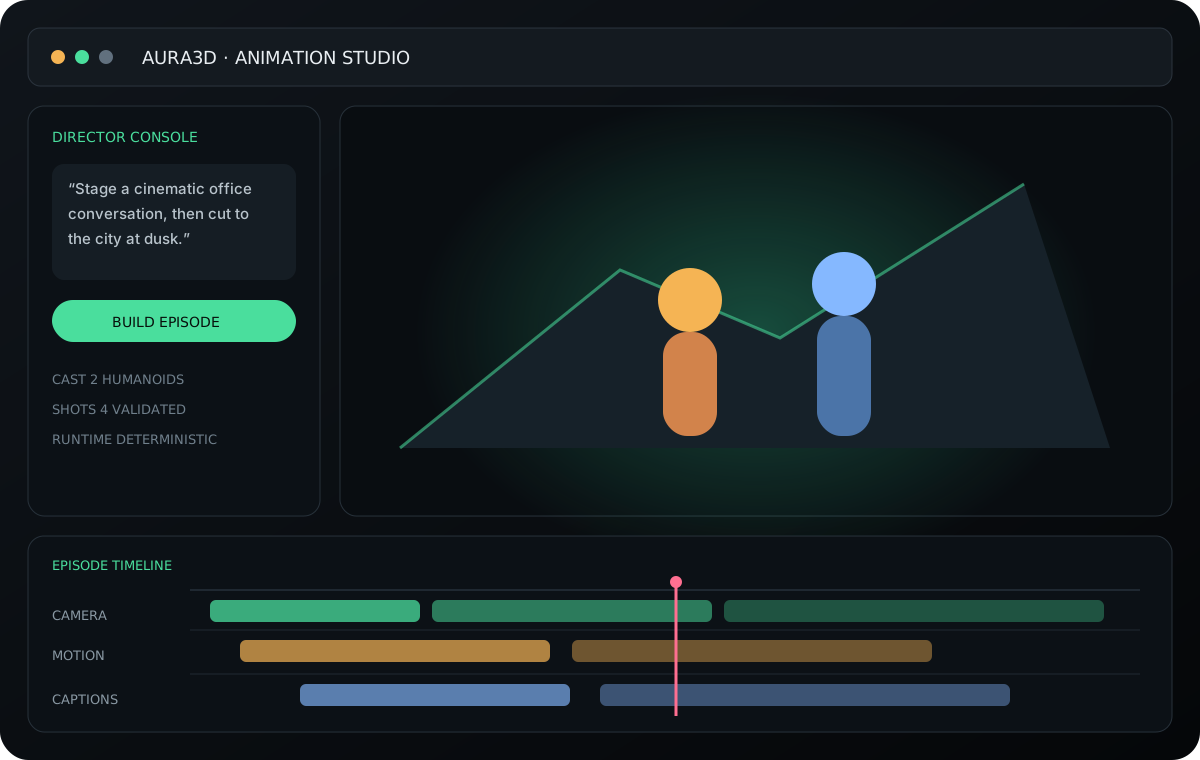
The web studio is a three-pane NLE — a Director Console, live previews, and real validated commands, not a mockup. Renders are silent by design; AuraVoice owns the voice. A clean, stylized look you can watch in minutes — and when you want photoreal characters, drop in your own rigged GLB and it renders them too. Describe the next shot, and the scene changes. It just renders.
Aura3D gives AI coding assistants the nouns and verbs of browser 3D: scenes, models, lights, cameras, materials, effects, interactions, UI, and deployment-ready assets behind a compact TypeScript API. The result is fast to generate and simple to refine.
// Typed GLB + 4.0.0 effects.* pipeline: register once, then compose the scene.
import {
  createAuraApp, scene, model, camera,
  lights, effects, looks
} from "@aura3d/engine";
import { assets } from "./aura-assets";

createAuraApp("#app", {
  ...looks.appOptions("studio-product"),
  diagnostics: { overlay: true },
  scene: scene({ background: "#05070a" })
    .add(model(assets.boombox, { scale: 1.2 }))
    .add(lights.studio({ intensity: 1.2 }))
    .camera(camera.orbit({ distance: 4 }))
    .add(effects.bloom({ intensity: 0.28 }))
    .add(effects.ambientOcclusion({ intensity: 0.35, radius: 0.45 }))
    .add(effects.contactShadows({ opacity: 0.45, blur: 1.6 }))
    .add(effects.vignette({ intensity: 0.22 }))
});
// Typed assets & 4.0.0 effects.* keep models and post-processing deterministic.
Aura3D gives prompts structure: cinematic particles, physical playgrounds, data galaxies, material labs, city blocks, mini-games, humanoids, and product viewers. The assistant starts with a maintained scene system, then edits the TypeScript you own.
// Prompt + asset path: bring the GLB, then stage it.
import {
  createAuraApp, sceneKits
} from "@aura3d/engine";
import { assets } from "./aura-assets";

const kit = sceneKits.productViewer({
  asset: assets.conceptCar,
  lighting: "cinematic",
  controls: "orbit",
});

createAuraApp("#app", kit.toAppOptions());
Every flagship game in the 4.0.1 showcase is built on @aura3d/engine@4.0.1 with typed glTF assets, real-time PBR lighting, and post-processing: Aura Slam 3D, Apex Overdrive, Thermal Drift, and Grid Dispatch.
Championship 3D tennis stadium featuring 2-bone IK articulated athletes, 6 courts, Smash Lab, and 32-player World Tour.
Fly the Apex Interceptor over a gridlocked sunset freeway with cold-gas thrusters, barrel rolls, carrier ramp launches, and sky-lane dogfights.
High-speed cyberpunk anti-gravity drone racing across Neon Foundry, Thermal Core, and Orbital Dockyard with 7 drones and thermal management.
Remote-pilot stuck autonomous vehicles across a live 3D San Francisco grid with LiDAR point-cloud overlay, Apex Lidar Cruisers, Cyber Coupes, and streetcars.
Start with a template, add a real asset, and let the assistant shape the scene. The agent writes code. You bring the assets. Aura3D is not a hidden runtime generator; it keeps the browser 3D foundation visible so your team can focus on the moment users see.
Aura3D 4.0.1 consolidates materials, environments, effects, looks, game kits, physics, navigation, animation, audio, and scene kits into the single @aura3d/engine@4.0.1 root entrypoint—backed by 24 active public packages on npm, with all < 4.0.0 versions and the 5 legacy compatibility packages deprecated in full.
A 3D landing page has to feel effortless: fast first load, correct assets, clear controls, and no broken routes. Aura3D keeps those production details close to the code.
Aura3D starts with its browser runtime. Named lower-level examples can opt into WebGPU only when adapter, backend, dispatch/render, fallback, telemetry, and pixel evidence support the exact route.
The practical default for agent-written browser 3D: canvas setup, resize, render loop, camera, lights, interactions, and cleanup handled by the app API.
WebGPU examples depend on browser and hardware support. The lower-level path carries a 96-joint skinning palette and has emulation/package proof; real-device WGSL execution and root-default WebGPU remain evidence-bound. Unsupported routes must report or use their documented fallback.
The CLI fingerprints the file, writes the manifest, and generates typed asset references. From there, the assistant can compose a polished product scene without brittle paths.
# The file already exists on disk.
npx @aura3d/cli@4.0.1 assets add \
  <path-to-source-model> \
  --name robot \
  --public-path /aura-assets/

# Generated files:
./aura.assets.json
./src/aura-assets.ts
import { assets } from "./aura-assets";

scene()
  .add(model(assets.robot))
  .add(lights.studio());

// Stable path: model(assets.robot)
Describe the scene. Generate primitives, particles, physics, data, controls, and product viewers. Bring real GLB assets when you have them. Aura3D turns browser 3D into a product surface your team can design, edit, verify, and ship when the gates pass.